
We designed it the way a security officer would want it designed.
One of our founders has spent a career in cybersecurity, risk and compliance. These are the controls we wouldn’t ship without, starting with how the AI is governed.
AI you can govern, not just trust.
Every request to the advisor passes through two layers of rules before the AI sees it. One you control. One nobody can switch off, including us from inside the product.
Your organization’s policy
Set by your administrators, on top of the floor
- Require approval for every deployment
- Allow certified blueprints only
- Let the advisor open screens, or keep it explain-only
Platform floor
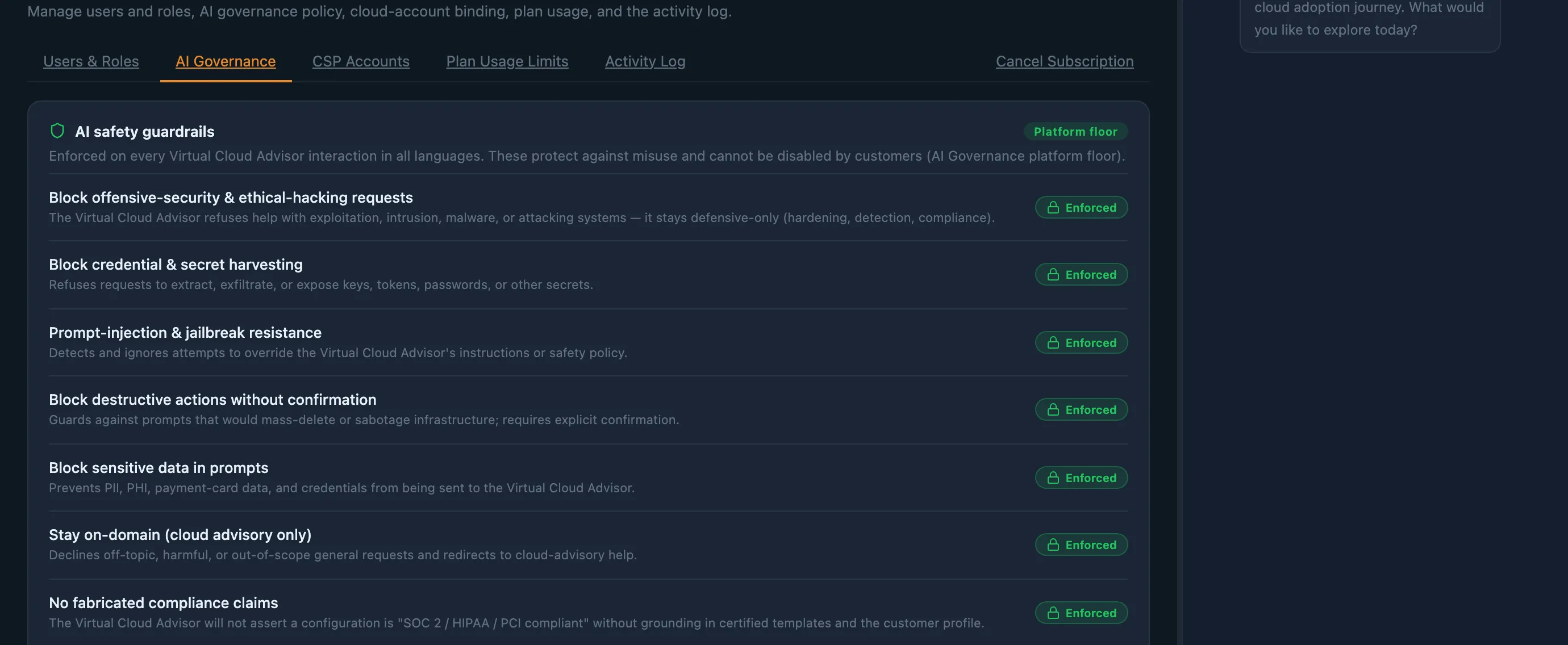
Always on, in every language, for every customer. Can’t be weakened.
- Refuses to help attack systems
- Refuses to harvest credentials or secrets
- Resists prompt-injection and jailbreaks
- Blocks personal, health and payment data
- Never claims compliance without grounds
- Never writes infrastructure code
- Stays on cloud advisory
Can the AI act on its own?
- No. It proposes; a person presses the button.
- It can open a screen with filters applied or download a report you could already export.
- It can’t deploy, approve, delete, change billing, roles, MFA or its own settings. The platform refuses, whatever anyone asks.
- It works inside your permissions. If you couldn’t do it by hand, neither can the advisor.
What happens to our data?
- Personal, health and payment-card data and credentials are blocked before they reach the AI.
- Conversations stay inside your organization’s isolated workspace.
- The full text of AI requests and responses isn’t kept in system logs.
- Your conversations aren’t used to train outside AI models without your explicit consent.
Can we see what it did?
- Every advisor action, and every request it refuses, is written to an audit log nobody can edit or delete.
- Actions taken by accepting a suggestion are marked “advisor-assisted”, with the person who approved them.
- Suggestions are rate-limited per conversation and per organization, so a runaway loop can’t act at scale.
Can we trust its answers?
- Recommendations come with their reasoning, a match confidence and a cost estimate shown as a range.
- It won’t call a setup “HIPAA compliant” or “SOC 2 compliant” unless that’s grounded in a certified blueprint and your profile.
- Savings are only calculated from figures you’ve entered, never invented.
The rules aren’t a promise on a website. They’re on screen.
Your administrators can read every platform rule in Settings → AI Governance, marked as enforced, and switch your own policies on or off. Turning off “advisor may act on screens” leaves an advisor that explains each step and lets your people carry it out.
Your account, your keys
- We don’t store your cloud credentials. You create a role in your own account that the platform assumes for each job, and you can revoke it whenever you like.
- You prove you own an account before anything can be deployed to it, and it’s verified again at the moment of deployment.
- Your management (root) account is never a deployment target, however it’s configured. Workloads go into member accounts.
Nothing changes without a plan and a second person
- Every deployment produces a plan first. You see exactly what will be created, changed or destroyed.
- Each plan goes through an automated infrastructure security scan before it can be approved, and plans expire rather than waiting around indefinitely.
- The person who submits a deployment can’t approve it. Tearing an environment down goes through the same approval gate.
- The rare admin override, for when the only approver has left, needs a written reason, is logged, and is refused if anyone else could approve.
Only certified blueprints get deployed
- Blueprints must meet our base reference architecture, a cloud-agnostic set of controls for identity, logging, encryption, networking and recovery.
- Infrastructure code is scanned at the template level, so resources a VCA blueprint deploys should produce zero findings. If one ever does, we want to hear about it.
- The advisor never writes infrastructure code, so nothing hand-written can slip past that review.
Security you can keep watching
- Run a security posture scan on each cloud and see a score, a trend and every check: passing as well as failing.
- Findings are attributed to a VCA blueprint, your account baseline, or resources you created, so the right person fixes the right thing.
- Accepting a risk is a recorded decision, not a way to hide a finding. Compliance reports include accepted risks with the reason.
Your data stays yours
- Each customer’s data is kept isolated, separate from every other customer’s.
- Team members join by invitation only. There is no company directory, so nobody can discover your workspace.
- Role-based access, MFA, and an activity log that can’t be edited or deleted, even by administrators.
What we don’t claim
Blueprints are designed as strong starting points for frameworks such as HIPAA, PCI-DSS and SOC 2, and the platform shows you how your deployed estate measures against them. Deploying a blueprint doesn’t make your organization compliant on its own: that depends on how you run it and what your auditor concludes. We won’t tell you otherwise, and neither will the advisor.
Have your security team kick the tyres.
Early-access customers get a direct line to the people who designed these controls. Bring your hardest questions.